NYRIUM ORIGINAL / BY PAD7RAR
PAD7RAR-MVP
Your round. Your signature.
Personalize CS2 MVP moments with custom songs, GIFs and a dedicated banner. An interactive panel, Premium content, individual volume and nine languages — all available through !mvp.
Watch the presentation ↗Contact on Discord ↗LATEST UPDATE · 0.4.0
Your panel. Your name.
PAD7RAR-MVP 0.4.0 · Nyrium Content Tools 1.0.7
- The panel title now displays each player's own name.
- CustomHud validation is fixed by removing the incompatible html title attribute.
- A single applause variant remains. Old monochrome/sepia selections use the original; custom GIFs are preserved.
- Random MVP uses only free songs when no valid manual selection is available, even while database preferences are loading. Temporary choices do not overwrite saved preferences.
Updating to 0.4.0: update the DLL and .deps.json, then re-upload the repository's Workshop resources. Preserve configurations, catalogs and player data.
Content Tools remains at 1.0.7 and is unchanged by this release. The project reports in-game confirmation of the menu and Random MVP, plus 103 passing local automated checks.
Release notes on GitHub ↗Installation & updates
- Prepare compatible Metamod, CounterStrikeSharp (.NET 10 / API 1.0.375) and MultiAddonManager.
- Publish the compiled Workshop addon, or merge it into your existing addon and re-upload. Keep other plugins' resources.
- Stop the server and merge
server/game/csgo/into itsgame/csgo/directory. Upload dependencies and .deps.json before the DLL. - For a new installation only, copy
examples/config.tomlinto the plugin configuration directory. Add the Workshop ID tomm_extra_addons, not only mm_client_extra_addons. - Restart and verify addon mounting, client downloads,
!mvp, audio preview, GIF and!mvpbanner.
Server files and Workshop resources have different destinations. The DLL does not belong in Workshop. Content Tools runs on the administrator's Windows PC.
Preserve configurations, catalogs and player data. Version 0.4.0 requires both a server update and Workshop re-upload. Older custom audio banks need regeneration with Content Tools and Workshop re-upload for the audio fix.
A panel that belongs in the game
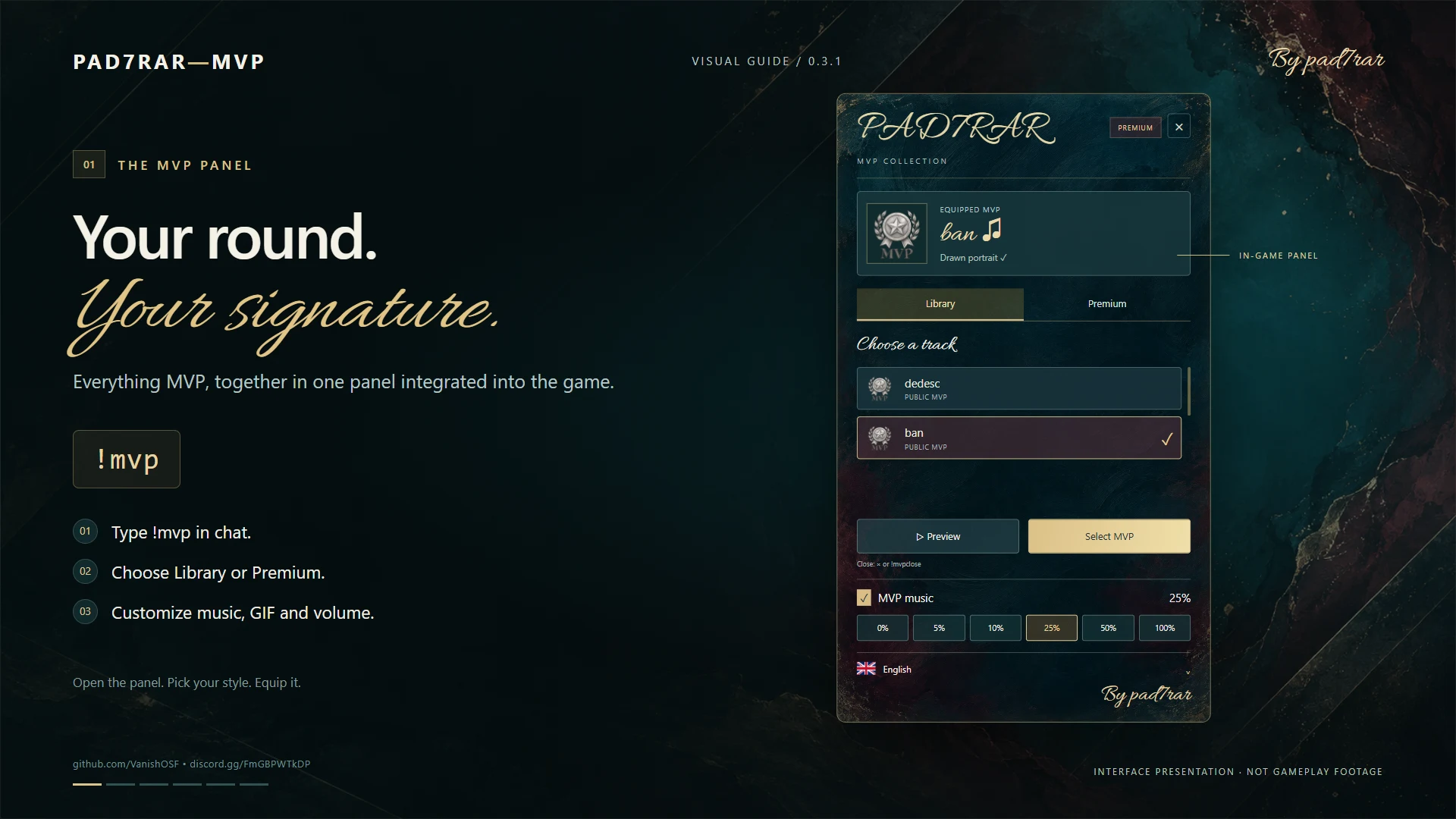
Type !mvp to bring your collection into view. Deep teal, burgundy and gold, painted accents and a calligraphic title frame an interface with working tabs, buttons and scrolling.
See your equipped selection, explore the library and personalize your next MVP without leaving the game.
Listen. Choose. Equip.
Preview songs before selecting them. Starting another audio preview stops the previous one. Your equipped song plays when you win the round MVP; with native-music suppression enabled, the plugin stops CS2 music before custom playback.
More than an anthem
Complete your selection with an animated portrait. Music and GIFs are equipped independently, so you can create your own combination.
The custom MVP banner brings the player's name, selected song and portrait together in a pencil-inspired design, signed By pad7rar.
A Premium collection for your community
Offer public songs and GIFs, build a Premium collection or reserve content for a specific SteamID. The server owner controls access through configuration and permissions.
Premium is an access tier; payments and storefronts are managed separately.
Every player chooses their experience
- Individual volume: 0%, 5%, 10%, 25%, 50% and 100%.
- Music on or off, directly in the panel.
- Nine languages: English, Romanian, Russian, German, Hungarian, Spanish, Portuguese, Serbian and Macedonian.
- Immediate language changes, with the choice saved for the next connection.
A library that can grow with your server
Nyrium Content Tools lets server owners prepare new MP3/WAV songs and GIFs without the plugin's C# source or rebuilding its DLL. Open the .exe application, add files, set access rules and click Build. GIFs are resized automatically for the plugin. Then update the server and Workshop addon.
Players download assets through Workshop when the addon is configured in MultiAddonManager. Addon publishing is a separate administrator step.
Start with one command
!mvp → Library / Premium → Preview → Equip
Choose your GIF separately, adjust the volume and get ready for the next round.
PAD7RAR-MVP — Your round. Your signature.
Frequently asked questions
Can I add my own songs and GIFs?
Yes. The package includes the content builder and guides. Windows, PowerShell and CS2 Workshop Tools are required to prepare assets.
Do players need the plugin DLL?
No. The plugin runs on the server; players need the resources from the configured Workshop addon.
Is a database required?
Language and GIF preferences are stored locally by SteamID. Volume is saved locally by SteamID in data/volume-selections.json, including across maps. Clientprefs integration is optional.
Does the panel automatically detect the Steam client's language?
No. Players can choose a language in the panel. Before manual selection, it uses the language available through CounterStrikeSharp.
What does the server need?
Metamod, CounterStrikeSharp compatible with the .NET 10 / API 1.0.375 build, the plugin and its dependencies, plus MultiAddonManager for the Workshop addon. Preserve player data when updating.
Your round. Your signature.
Animated interface presentation, not CS2 gameplay footage. The in-game appearance may vary. Visuals are labelled 0.3.1; the presentation describes version 0.4.0.
Open video separately ↗